 芋の里
芋の里
本稿はProcessing Advent Calendar 2025 への参加記事です。
初めての方は初めまして!相撲大好き底辺ブロガーの芋の里と申します。
子供の頃から大相撲が大好きで、相撲をネタにした記事を数か月に1度くらい書いてます。
レベルは低いですが時々p5.jsを使用していますので、記事を投稿します。
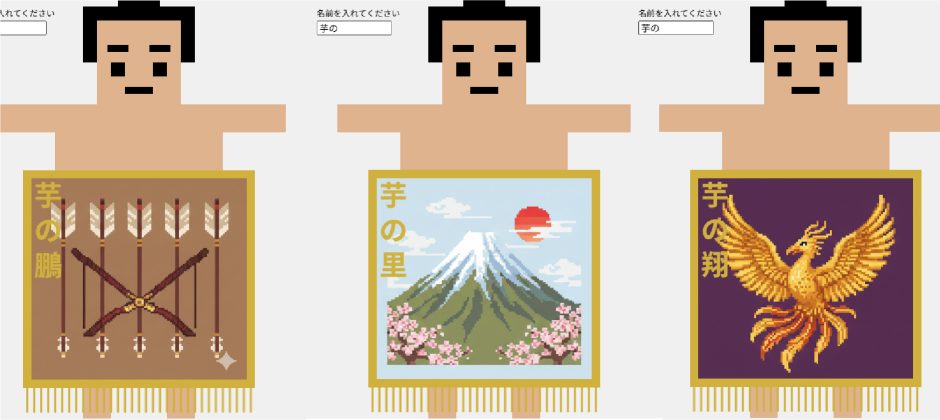
昨年に引き続き、相撲をテーマに「化粧廻しジェネレーター」を作りました。
化粧廻しジェネレーター
さっそく出来上がりをご覧ください。
芋の里
名前を入れてキャンバス内をクリックすると四股名が化粧廻しに入ります
コード
芋の里
jpg画像は必要ですが、そのままp5.jsにコピペすれば変更も可能です
// ===== 画像ファイル名のリスト =====
let imageFileNames = [
  '01.jpg',
  '02.jpg',
  '03.jpg',
  '04.jpg',
  '05.jpg',
  '06.jpg',
  '07.jpg',
  '08.jpg'
];

let images = [];
let inputField; // 入力フィールド
let suffixWords = ['富士', '鵬', '龍', '里', '翔']; // ランダムに選ぶ文字

// ===== 設定オブジェクト =====
let config = {
  canvasWidth: 500,
  canvasHeight: 600,

  rikishi: {
    centerY: 210,
    scale: 2,
    skinColor: [224, 178, 140]
  },

  body: {
    torso: { x: 0, y: 20, w: 120, h: 100 },
    leftArm: { x: -80, y: -20, w: 50, h: 20 },
    rightArm: { x: 80, y: -20, w: 50, h: 20 },
    leftLeg: { x: -30, y: 180, w: 20, h: 40 },
    rightLeg: { x: 30, y: 180, w: 20, h: 40 }
  },

  hair: {
    base: { x: 0, y: -80, w: 80, h: 40 },
    topknot: { x: 0, y: -90, w: 30, h: 30 }
  },

  face: {
    base: { x: 0, y: -60, w: 60, h: 60 },
    leftEye: { x: -15, y: -55, w: 10, h: 10 },
    rightEye: { x: 15, y: -55, w: 10, h: 10 },
    leftBrow: { x: -15, y: -70, w: 15, h: 5 },
    rightBrow: { x: 15, y: -70, w: 15, h: 5 },
    mouth: { x: 0, y: -40, w: 20, h: 5 }
  },

  mawashi: {
    x: 0,
    y: 400,
    w: 320,
    h: 300
  },

  goldenBorder: {
    strokeWeight: 12
  },

  fringes: {
    y: 550,
    yEnd: 590,
    spacing: 10,
    strokeWeight: 3
  },

  nameText: {
    x: 120,
    y: 280,
    size: 40,
    color: '#D4AF37', // 金色
    spacing: 50 // 文字間のスペース
  }
};

function preload() {
  for (let fileName of imageFileNames) {
    images.push(loadImage(fileName));
  }
}

function setup() {
  createCanvas(config.canvasWidth, config.canvasHeight);
  noLoop();
  rectMode(CENTER);
  imageMode(CENTER);

  // ラベルテキスト
  let label = createP('名前を入れてください');
  label.position(10, 10);
  label.style('margin', '0');
  label.style('font-size', '12px');

  // 入力フィールドをキャンバスの右上に配置
  inputField = createInput('');
  inputField.position(10, 30);
  inputField.size(100);
}

function draw() {
  background(240);

  drawRikishi(width / 2, config.rikishi.centerY);
  drawKeshoMawashiBase();
  drawMawashiImage();
  drawGoldenBorder();
  drawNameText();
  drawFringes();
}

function drawRikishi(cx, cy) {
  let s = config.rikishi.scale;
  push();
  translate(cx, cy);
  noStroke();

  fill(...config.rikishi.skinColor);

  let b = config.body;
  rect(b.torso.x * s, b.torso.y * s, b.torso.w * s, b.torso.h * s);
  rect(b.leftArm.x * s, b.leftArm.y * s, b.leftArm.w * s, b.leftArm.h * s);
  rect(b.rightArm.x * s, b.rightArm.y * s, b.rightArm.w * s, b.rightArm.h * s);
  rect(b.leftLeg.x * s, b.leftLeg.y * s, b.leftLeg.w * s, b.leftLeg.h * s);
  rect(b.rightLeg.x * s, b.rightLeg.y * s, b.rightLeg.w * s, b.rightLeg.h * s);

  fill(0);
  let h = config.hair;
  rect(h.base.x * s, h.base.y * s, h.base.w * s, h.base.h * s);
  rect(h.topknot.x * s, h.topknot.y * s, h.topknot.w * s, h.topknot.h * s);

  fill(...config.rikishi.skinColor);
  let f = config.face;
  rect(f.base.x * s, f.base.y * s, f.base.w * s, f.base.h * s);

  fill(0);
  rect(f.leftEye.x * s, f.leftEye.y * s, f.leftEye.w * s, f.leftEye.h * s);
  rect(f.rightEye.x * s, f.rightEye.y * s, f.rightEye.w * s, f.rightEye.h * s);
  rect(f.leftBrow.x * s, f.leftBrow.y * s, f.leftBrow.w * s, f.leftBrow.h * s);
  rect(f.rightBrow.x * s, f.rightBrow.y * s, f.rightBrow.w * s, f.rightBrow.h * s);
  rect(f.mouth.x * s, f.mouth.y * s, f.mouth.w * s, f.mouth.h * s);

  pop();
}

function drawKeshoMawashiBase() {
  fill(255);
  stroke(200);
  strokeWeight(2);
  let m = config.mawashi;
  rect(width / 2 + m.x, m.y, m.w, m.h);
}

function drawMawashiImage() {
  if (images.length === 0) return;

  let m = config.mawashi;
  let selectedImage = random(images);

  image(selectedImage, width / 2 + m.x, m.y, m.w, m.h);
}

function drawGoldenBorder() {
  noFill();
  stroke("#D4AF37");
  strokeWeight(config.goldenBorder.strokeWeight);
  let m = config.mawashi;
  rect(width / 2 + m.x, m.y, m.w, m.h);
}

// ===== 力士の名前を縦に表示 =====
function drawNameText() {
  let inputText = inputField.value();

  if (inputText === '') return;

  let randomSuffix = random(suffixWords);
  let fullName = inputText + randomSuffix;

  let n = config.nameText;

  // テキストの設定
  textAlign(CENTER, CENTER);
  textSize(n.size);
  textStyle(BOLD);
  fill(n.color);
  noStroke();

  // 1文字ずつ縦に表示
  for (let i = 0; i < fullName.length; i++) {
    let character = fullName.charAt(i);
    let y = n.y + (i * n.spacing);
    text(character, n.x, y);
  }
}

function drawFringes() {
  stroke("#D4AF37");
  strokeWeight(config.fringes.strokeWeight);
  let fr = config.fringes;
  let m = config.mawashi;
  let leftX = width / 2 + m.x - m.w / 2;
  let rightX = width / 2 + m.x + m.w / 2;

  for (let x = leftX; x <= rightX; x += fr.spacing) {
    line(x, fr.y, x, fr.yEnd);
  }
}

function mousePressed() {
  redraw();
}
コード説明
力士のキャラクターは四角で作成しました。
名前を入れると名前の最後に「富士」「鵬」「龍」「里」「翔」の中からどれかがランダムにつく形です。
絵柄もランダムに8種類の中から選ばれる形になっています。
 芋の里
芋の里
色々粗くてすみません
読んでいただき、ありがとうございました!
他の方のアドベントカレンダーもゆっくり見させていただき勉強します!